Monday, January 24, 2011

Sharable Bits: Compliments, Doing Nothing, Standing Desk

Blog post: Genuine compliments matter


Why it's worth sharing: Vicki A. Davis reminds us about how important it is to give genuine compliments to our students and colleagues every day. I certainly try to follow this advice in my day to day work. Remembering to thank people for their effort and acknowledging their success is a simple gesture that can make a big impact. After all, we all want to be good at what we're doing and to know that what we do is meaningful, don't we?

Challenge: Do Nothing for Two Minutes


Why it's worth sharing: It's a simple website with a simple idea: relax and do nothing for only two minutes. Easy, no? Well, it turns out it can be quite a challenge if you're used to constantly check your e-mails, Facebook, Twitter and what not. It's certainly a nice idea that encourages to stop and relax, even if it is just for our couple of minutes. Perhaps we'd all felt a little bit better if we passed this simple challenge every day. (via @mashable)

Idea: Standing desk

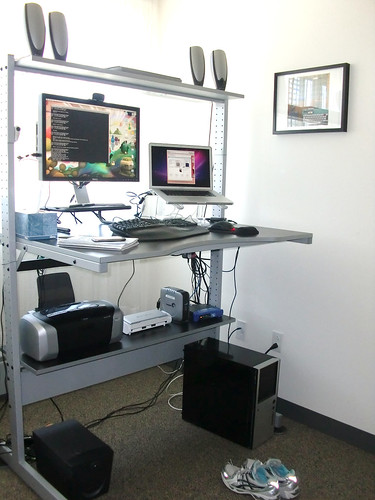
Standing desk

Why it's worth sharing: Gina Trapani's blog post Why and How I Switched to a Standing Desk provides a nice overview of the transition from a traditional "sitdown desk" to a standing desk and working on your feet. As someone, who tends to sit behind the computer desk in awkward positions all day long, I find this idea quite intriguing. I admit - I haven't decided to make the switch yet, but at least the post reminded me that I should get up and stretch more often during the day.

Sharable Bits is a series of weekly posts that will highlight some of the most interesting bits and bytes that I stumble upon. No bad news, just ideas that inspire, touch or entertain in a unique way.

Note: This is just an archive post. The blog has moved to a new home at blog.ialja.com, where you will also find a copy of the entire blog.


Thursday, January 13, 2011

Mobile single-tasking leads the way to a more human friendly desktop


The web seems like somethings everyone should know how to use by now. But what about the less experienced aka the majority of users? Do they really know how to use their browsers? And understand what's going on on their computer screens?

I think computers are still mysterious, magic boxes for a lot of people outside the tech savvy crowd, and we need to keep looking for solutions that can change that perception. Perhaps by learning from simple, easy to use, user centered mobile devices, like the iPad.


The web is a strange place for the average user

As a reader (or occasional visitor) of this blog, you probably have a good basic understanding of how the web works. You're probably familiar with the concept of a web browser and how your browser interacts with web servers to display different web locations. You know how to copy, type and check the URL of a website to make sure you've opened the right web page, and you're probably reading this page in one of the many tabs open in your browser, perhaps even an RSS reader.

But all of the above isn't such an easy task for everyone. If you think the web is easy to use, I challenge you to observe the way so-called "average users" interact with it. Users, who have never received any real training, and are not really interested in understanding how the whole system works. They just want to check their e-mail, share photos on Facebook or find a store's phone number on the web.

I have seem that many times in the past few months (while trying to teach them how to use a pretty complex online tool), and I must say it has changes my perspective. The web just seems like a different place for the average user than it is to me or probably you. It's a place where the Google search box is your starting point because you don't know the URL of your school's website, it's a place where you only use one window at a time (tabs? what tabs?), it's a place full of confusion and notifications you don't really understand. Update? Pop-ups? RSS? Java script? Is that even English?

Humorous Pictures

It's just so different from the world we, the tech crowd, live in. It's not a world where the lack of multitasking before iOS 4 was a problem, it's a world where no multitasking is a great feature.

Why do you make me switch windows and apps?

It's certainly something that we should all keep in mind when designing user interfaces and user experiences on the web. You think your registration process, which requires e-mail confirmation, is simple? Think again. The average user doesn't want to switch windows and apps, and doesn't want to read your friendly instructions about activation and other nonsense. They just want to get things done.

Photo: Microsoft.com
And that is where we can learn a lot from the new generation of smartphone operating systems (thinking mainly about iOS and Windows Phone 7, I'll leave my Android rant for another post). They make it easier for people to understand what they'll get and where to get it. With big, easy to tap icons, and a simple, physical Home button that always gets you back to the starting line. No complicated lists of programs, no need to decide where to save your files... In many ways, the mobile OS is smarter than your desktop OS, even though the "smartness" is a result of the limits such small devices have.

Let the OS do the work and just enjoy the ride

Many of the features that make current smartphones so pleasant to use, were first introduced by Apple. Of course, a lot of skeptics laughed at the lack of multitasking, physical keyboard and what not, but 4 years after the original iPhone came out, everyone is trying to make a better iPhone. Not a better smartphone per se, but a better iPhone. And even though the geeks love Android for being a more open platform, iPhone keeps setting the standard for the high-end smartphone market.

And I think Apple is actually on the right track again with the concept of Mac OS X Lion, the next major upgrade to their desktop OS due to be released this summer. Lion will take a bold step at bringing features from the mobile world - the magic of iPad, as they call it - to the desktop. A unified place to download, buy and update your applications, a launchpad with big, colorful icons, and full-screen apps that take away all the distractions of your desktop.

Photo: Apple.com
I can see all this being a big hit with the average users (time to switch grandpa to Mac OS X!). An app for Facebook, an app for your e-mail, an app for your workspace (which lives in the cloud, but you don't really know or care about it), and an app for Google, so you can find everything else. And you don't have to worry about whether apps are closed or open and about saving your work. You want to do something else? Fine, hit the "Home button" and come back to the first app when you're done, picking it up just where you left it.

Mobile devices are changing our expectations

While the emphasis in the discussions about the mobile revolution often seems to be on portability and the business opportunities of mobile apps, let's not forget about how all these mobile devices are changing the way people interact with computers and their expectations.

We are already seeing examples of how the iPad and similar devices are influencing web design, and I definitely think that's a positive trend that will make more and more web destinations feel more natural and uncluttered. Now is the right time to take a look at the web sites we build and maintain, and figure out how to make it more mobile and consequently human friendly.

And the end result will not be something just the less tech savvy users will enjoy; I think we can all benefit from less clutter and distractions. After all, it makes much more sense to have interfaces that adapt to the way people think, than to have people adapt to interfaces they have to use.

Additional readings:


Note: This is just an archive post. The blog has moved to a new home at blog.ialja.com, where you will also find a copy of the entire blog.

Sunday, December 26, 2010

Happy Holidays

I just wanted to stop by for a minute to wish everyone Happy Holidays and a 2011 full of new discoveries with my favorite video of this holiday season. See you next year!


Note: This is just an archive post. The blog has moved to a new home at blog.ialja.com, where you will also find a copy of the entire blog.


Sunday, December 19, 2010

14 great tools for teaching, learning and collaboration

When delivering introductory courses for teachers that want to start using Moodle, the most popular LMS used in Slovenian schools, I also like to share a list of my favorite tools that can be used with Moodle or independently. I think it's important for teachers to realize that a LMS can be a good starting point if you want to provide your students with an online hub for your course, but that there are many other tools out there that are better suited for certain needs.

And I just realized I haven't shared this list on my blog yet, so here it is: 14 great tools that can help teachers create interactive content, collaborate, and facilitate learning. All of these tools are free and available either online or on multiple platforms (Windows, Mac).


Desktop software

 Hot Potatoes - a simple, free tool for creating quizzes and other interactive activities that can be easily included into Moodle.

 eXeLearning - a free, open source software for creating and publishing web content. Teachers can easily export content into SCORM and add it to Moodle. Great for our teachers because it's also available in Slovenian (and other languages).

Xmind - an open source brainstorming and mind mapping tool.

Google tools

Google Docs - easy to use collaborative tool for documents, spreadsheets and presentations.

 Google Sites - a simple tool for creating web pages.

Blogger - free, simple to use blogging platform. If my grandpa can use it, so can your non-tech savy teachers and students. Love the fact that you can have private blogs, available only to specified readers.

Picasa and Picasa web albums - Google's free image organizer and editor that also supports free web albums. I admit - I don't really use Picasa (I have iPhoto on my Macs), but my grandpa loves it, so I like to recommend it to non-Mac folks.

Multimedia

ScreenToaster - free online screen recorder. Can easily be used for simple screencasts.

Audacity - open source audio editing software. Again, as an iLife user, I don't really use it myself, but I know a lot of teacher who use it in classrooms.

Anywhere, anything

Evernote - my absolutely favorite tool for notes and what not. I use it to write drafts fro blog posts or messages for my students, to save notes while grading, as a collection of links and ideas and so much more. I love the fact that it's both a desktop and online app, so you can really access all your notes from anywhere (even on my mobile phone).

Google Reader - web RSS reader. My favorite way of keeping track of blogs on all sorts of different subjects.

Dropbox - I've got to agree with their tagline: "the easiest way to store, sync, and, share files online". I even know teachers that use Dropbox to collect student's assignments, and it's also great as a personal backup tool and as a way to collaborate on files with others.

Sharing

SlideShare - my favorite tool for sharing presentations that can easily embedded almost anywhere on the web.

Scribd - simple tool for publishing docs and embedding them almost anywhere on the web.


And that's it, that's the list of tools I like to show to teachers starting to explore digital learning and learning. Yes, yes, I know there are many other tools that would deserve to be on the list, so I also provide a link to Jane Hart's amazing Top 100 Tools for Learning 2010 List (but a list of 14 items is usually easier to digest for beginners).

So, here's my questions for you: which 14 tools would your put on your list, while keeping in mind they should be easy enough for beginners and freely available on all platforms? Let me know in the comments!

Note: This is just an archive post. The blog has moved to a new home at blog.ialja.com, where you will also find a copy of the entire blog.


Friday, December 17, 2010

Sharable Bits: Heroes in Our Lives, Clickers, Search Zeitgeist

Photos: Superhero Therapy for Grandma

More photos and info at My Modern Metropolis

Why it's worth sharing: French photographer Sacha Goldberger managed to help his grandma overcome depression by dressing her up as a superhero and making some amazing photos along the way. I love the photos - the fact that they helped the photographer's grandma smile again, and as a reminder that it only takes a little imagination to make those we love feel special. After all, we all need a little attention now and then, and the knowledge that we matter to someone, don't we?

Tool: Clickers, a simple technology for classrooms

Donald Clark provides seven simple uses and advantages of using clickers in his post Clickers: mobile technology that will work in classes

Why it's worth sharing: Mobile clickers provide a great example of how much we can do with simple tools that are applied in the right way. You don't have to invest a lot of money to buy expensive tools with limited use. Instead, focus on more versatile tools, like clicker mobile apps that will work on students' existing equipment.

Video: Google Zeitgeist 2010: Year in Review


Why it's worth sharing: With the year ending, everyone is making lists and recaps of the main events of the year coming to an end. Google's video Zeitgeist is my favorite recap so far. It reminds us of the challenges we face, the tragedies, but also of the achievements, things that made us smile. I guess I'd just like to thank Google for all the successful searches in the past year and for helping me find my way around the web. How the hell did we find anything before we had Google? :)

Sharable Bits is a series of weekly posts that will highlight some of the most interesting bits and bytes that I stumble upon. No bad news, just ideas that inspire, touch or entertain in a unique way.

Note: This is just an archive post. The blog has moved to a new home at blog.ialja.com, where you will also find a copy of the entire blog.


Tuesday, December 14, 2010

Embracing the mind games and bad runs

I recently came across the following short movie about the mind games runners face when choosing to run and challenge themselves on a daily basis. I think it's a great snapshot if internal battles that go through our heads when we try to do something outside our comfort zone:


Yes, it's hard to go out and run with temperatures below 0 degrees Celsius, it's hard to go out and run in rain or even snow. And when you do it, the internal battles don't end. You think you won't be able to run more than a mile today, your legs are heavy, the water puddle appears out of nowhere and your feet are wet now... The list of "reasonable" excuses seems endless.

And this isn't specific to running, of course. We play that sort of mind games when it comes to other tasks that are difficult and (usually) non urgent. Going into super productive mode when facing a deadline or pressure from someone comes naturally to us, but when you choose to do something for your own good, like a New Year's resolution... ah, that's when the mind games come into play.

And it's that sort of mind games I personally often face when it comes to blogging. I'll finish this blog post tomorrow... What if my ideas aren't good enough? Someone is better at this than I am...

But if there's something I've learnt from running on my own, it's that the effort pays off in the end. Mind games are part of the challenge, and the trick is to take it slowly, one run at a time, stick to your schedule, and not let the bad runs stop you. Oh yes, there will be bad runs in the mix, you can count on it. But in the end it's those runs that count the most and make you stronger. Because afterwards, you feel like a hero, and you won the game against the part of you that wants to keep you safe by doing nothing.

inspire

So, what are you waiting for? Go take that run, publish that blog post that has been collecting dust as a draft for way too long now, take the trip you've always wanted to take, start that big personal project you've been putting off. Just don't fear the bad runs.

Note: This is just an archive post. The blog has moved to a new home at blog.ialja.com, where you will also find a copy of the entire blog.


Friday, December 10, 2010

Saving bear cubs in Cataclysm - or - the story of why e-learning needs game designers

This week Cataclysm, the third, long-awaited expansion for the massively multiplayer online role-playing game World of Warcraft (WoW), has finally been released. The expansion brought many changes to the game and completely redesigned Kalimdor and Eastern Kingdoms, the two old continents that have been part of the game since its launch. In a sense, it does feel like a new game all together, and even experienced players have to relearn many aspects of the game.

But I'm not here to talk about all the game changes and complain about the missing portals in Outland and Northrend. Instead, I'd like to play a bit with some of the new elements of the game that facilitate learning and could be used to improve serious (aka not fun) online learning.

It must be said that WoW has never been a difficult game to learn. The basic mechanics and interface elements are pretty straightforward and easy to pick up even for casual players like myself. But I've got a feeling they took everything even a step further in the new expansion. Let's take a look at examples I've encountered so far as I'm trying to level up my gnome mage to level 85. So please, hop on my flying gryphon, so I can show you around.


Just in time learning

Cataclysm seems to be really good at providing simple tips to guide you through the game. For instance, as you reach a new level, you get notified of any new abilities or talent points that are available to you. A small, but very useful reminder.

Similar tips have also been implemented in some of the quests (missions you complete in the game). Apart from tips and hints in the quest instructions, you now also get easy to follow tips as you do the quest. For instance, tips on the procedure needed to complete the quest: 1) equip the lance, 2) now mount the bird, 3) ok, now click the button to flap the wings and make the bird fly! Easy to understand, and displayed just when you need it; you're not told how to fly the bird unless you've got your lance ready and have saddled up the bird.


Sounds simple, yes? So why don't we display tips like that in our online learning environments? "Stuck on the task? Head to the forum and ask for help!" And by the way, by tips I don't mean a whole set of complex instructions; we all know few people read the manual. By tips I mean simple to understand one line suggestions on what you should do next. For example, "Don't forget to replace the lance with your main weapon after you've completed the quest!"

Challenges you care about

While they are still many "Kill n of X, so I can make Y" quests in Cataclysm, you now often get quests that are more meaningful and more fun to do. For instance, one of the quests asked me to climb a tree, pick up the young bear cubs stuck in the trees, climb to the top, and toss them on a trampoline, so they can return to safety. I've got to admit I wanted to keep saving the cubs even after I saved the required amount for the quest!


What makes this quest great is that players can easily relate to the theme. You surely don't want to leave adorable bear cubs stranded in the trees, do you? The quest isn't just something you have to do to get more experience points, but something you want to do because you care about the bears (and because it's fun to climb trees).

Similarly, we're all more willing to learn about things we care about. And we care about things that are relevant to us, about things that touch us on an emotional level. And that can be achieved by telling great stories. Not stories like "Annie has 6 marbles and loses 2, how many does she have left?" (who the hell is Annie and why should I care?), but stories that capture our imagination, that get us involved. How do I save the bears? Won't they get hurt after I toss them on the trampoline?

Making the player feel part of something bigger

Games have always done a great job at making players feel special. You're the hero, the future of the world is in your hands; only you can save the princess! And WoW has always emphasized the importance of your actions through quests texts and interactions with various non-player characters in the game. But in Cataclysm, there is even more emphasis on making your storyline personalized (using phasing technology), especially in the starting zones that you go through as a new character.

The experience of starting a new worgen character is a great story on its own, told over and over again for each new player. You start as a human character, helping your people defend your city, which is under attack by the savage worgen beasts. As you're trying to get more help, you get bitten by one of the creatures, and at one point, you find yourself in jail, accused of turning wild. The world changes around you and the non-player characters help you to fill in the story of what's going on.

Similarly, as a high level player you are told to take a mercenary ship that will take you to one of the new continents of the expansion. While you wait for the ship to arrive, a group of Stormwind soldiers chatters around you about the recent world events, the Cataclysm. And just by listening to the soldiers, you can learn about what's new and about Deathwing, the dragon that is the cause of all the changes brought by Cataclysm.


It doesn't feel like homework, like something you have to do. You just casually listen in to the conversation the characters around you are having. It feels authentic, and it makes the Cataclysm story seem more believable, more tangible.

And a meaningful narrative is often what we fail to convey in online learning environments. We provide students with a series of resources and activities that will supposedly guide them to achieve the desired learning outcomes, but it's usually all boring, disconnected from reality, just an endless to-do list... Well, it isn't learning if it isn't hard, right? Well, no, I believe there must be a way to place fun and learning in the same bag.

Being an active member of the group pays well

Speaking of making the player feel special; Cataclysm also introduced a guild leveling system. Guilds (groups of players) now get experience points through various activities by their members. As a guild levels up, its members can get special perks and abilities. In order to use guild abilities, you have to build up your reputation with your guild by being an active player. So basically, it pays well to be loyal and active in your guild.

WoW Guild (source: WoWCataclysm.net)

Compare that to how groups usually work in our classes. Students, who do nothing, often get rewarded by choosing an active group that covers up for the inactive "player". Sucks, right? Well, it could be fixed if we also measured a student's "loyalty" to the group, just like in WoW. Unless you contribute enough, you just can't get the group perks (i.e. a good grade), so you're encouraged to play nicely with others and complete group tasks.

But my class just can't compete with WoW ...

I know what you might be thinking - it's easy to talk about having fun in immersive games like WoW, but making learning fun is just too difficult. Well, guess what? Making games fun isn't an easy job either! Good game design is both science and art that is difficult to master, and it takes tons of trials and errors to get it just right. WoW has been around since 2004 and in every expansion you can see big, gradual improvements in game design.

So, what I'm suggesting is that we find better ways to apply the lessons learned by game designers to our online learning environments and instructional design. E-learning will probably never be as fun as playing WoW, but can't we all just try a little harder to make learning a bit more engaging than flipping through sleep inducing "interactive" courseware, and to start telling our students meaningful stories? Perhaps we won't be saving bear cubs in class, but there are many other missions we all care about and can teach us about what we need to know along the way.

And it doesn't need to be in 3D or full immersive environments. With a little imagination and clever game design I suspect we could turn our boring text-centered Learning Management Systems into Learning Experience Enabling Technology - LEET systems. We all know many teachers are great storytellers; we just need to find a way to enable them to tell better stories online as well.

Related posts:


Note: This is just an archive post. The blog has moved to a new home at blog.ialja.com, where you will also find a copy of the entire blog.